We Rebuilt Commutely's Live Activity From Scratch — Here's Why
TL;DR: Commutely's redesigned Live Activity replaces confusing progress bars with actual clock times (9:47, 9:51), shows 4 upcoming trains instead of 3, and adds a 15-minute weather forecast so you know if you need an umbrella before you leave. One glance at your lock screen tells you everything.
I've been staring at Commutely's Live Activity for months, and something kept bothering me. The progress bars and countdown rings looked nice, but they didn't actually help me decide anything.
A bar at 50% full could mean 2 minutes or 10 minutes. I'd still have to do math. That's the opposite of what a subway app should do.
So I rebuilt it from scratch.
What Commutely Actually Needs to Answer
When you're about to leave for the subway, you have three questions:
- Should I run or walk?
- Which train is next?
- Do I need an umbrella?
The old Live Activity answered the first two — sort of. You'd see train badges with countdown timers. But "arriving in 4 min" requires you to know what time it is now. And it said nothing about weather.
The new design answers all three at a glance.
Clock Times Instead of Countdown Timers
The biggest change: trains now show actual arrival times.
Instead of "4 min" you see "9:47." Instead of doing mental math (okay it's 9:43, plus 4 minutes...), you just read the time. Your lock screen already shows the current time — now your trains show arrival times right next to it.
I also removed the progress bars entirely. They were eye candy, not information. A bar slowly filling up looks satisfying, but it doesn't help you catch a train.
4 Trains Instead of 3
The old design showed 3 upcoming trains. The new one shows 4.
Why? Because sometimes the first train is about to leave and you're not going to make it. You need to see what's next. With 4 trains visible, you always have options.
The Dynamic Island compact view now shows 2 trains instead of 1 — same logic. If the first train departs while you're walking, you can still see the next one without expanding anything.
"Next 15 Min" Weather Forecast
Here's the feature I'm most excited about: weather.
When you start a Live Activity, Commutely fetches the forecast around your destination station. Not a full-day forecast — just the next 15 minutes. That's your walking window.
The Live Activity now shows something like:
🌧 Next 15 min: Rain · 48°
One line. Tells you exactly what you need: grab an umbrella or you're fine.
I went back and forth on the wording. "15 min forecast" felt clinical. "Next 15 min" reinforces what Commutely is about — we've got you covered for your walk to the station.
The Layout
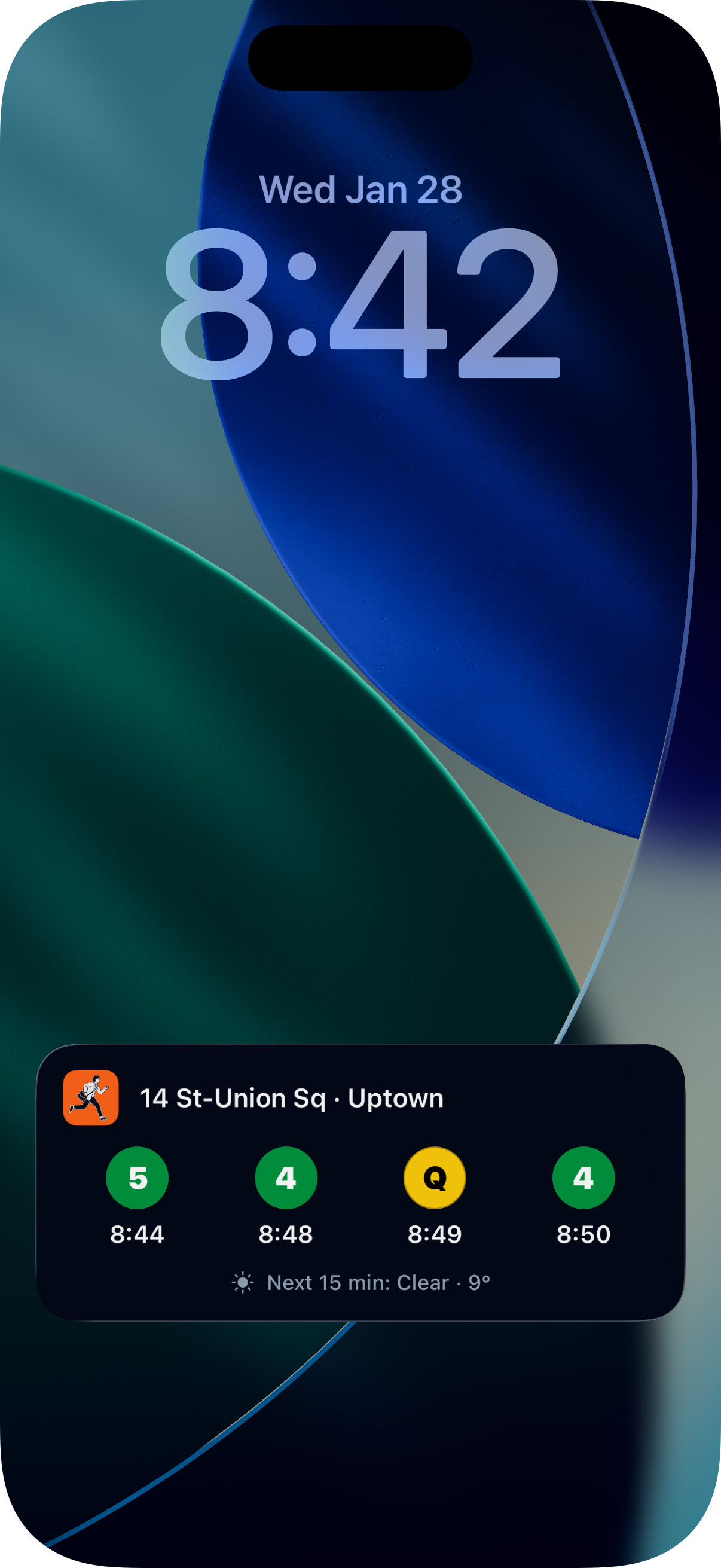
Here's what the new lock screen Live Activity looks like:
- Header: Running dude icon + Station name · Direction
- Trains: 4 train badges with clock times (Ⓠ 9:47 Ⓑ 9:51 Ⓠ 9:58 Ⓑ 10:04)
- Weather: Icon + "Next 15 min: Condition · Temp"
No progress bars. No countdown timers. No "last updated" timestamp cluttering things up. Just the information you need.
One Glance, Three Answers
The goal was always to make checking subway times as fast as glancing at your phone. But "subway times" was too narrow. What you really want to know before leaving is:
- When's my train? (clock times)
- What if I miss it? (4 trains visible)
- What's the weather? (15-min forecast)
Now you get all three in one glance.
Try It Now
The redesigned Live Activity is available in the latest version of Commutely on the App Store.
If the new design is helping you catch trains (or avoid rain), I'd really appreciate a quick App Store review — it helps other NYC commuters find the app. And if you know someone who's always checking weather apps before their commute, send them the link.
Frequently Asked Questions
What changed in the new Live Activity?
Clock times replace progress bars, you see 4 trains instead of 3, and there's a weather forecast showing conditions for the next 15 minutes.
Why remove the progress bars?
A progress bar at 50% doesn't tell you anything actionable. Is that 2 minutes or 10? Clock times like "9:47" let you instantly know when to leave.
How does the weather forecast work?
When you start a Live Activity, Commutely fetches the weather around your destination station. It shows temperature and conditions (Rain, Snow, Clear) for the next 15 minutes — just enough to know if you need an umbrella.
What does the Dynamic Island show now?
The compact pill shows your next 2 trains with badge and time. Long-press to expand and see all 4 trains plus weather.